ANDONT
SKU:B0D3WPX5N7
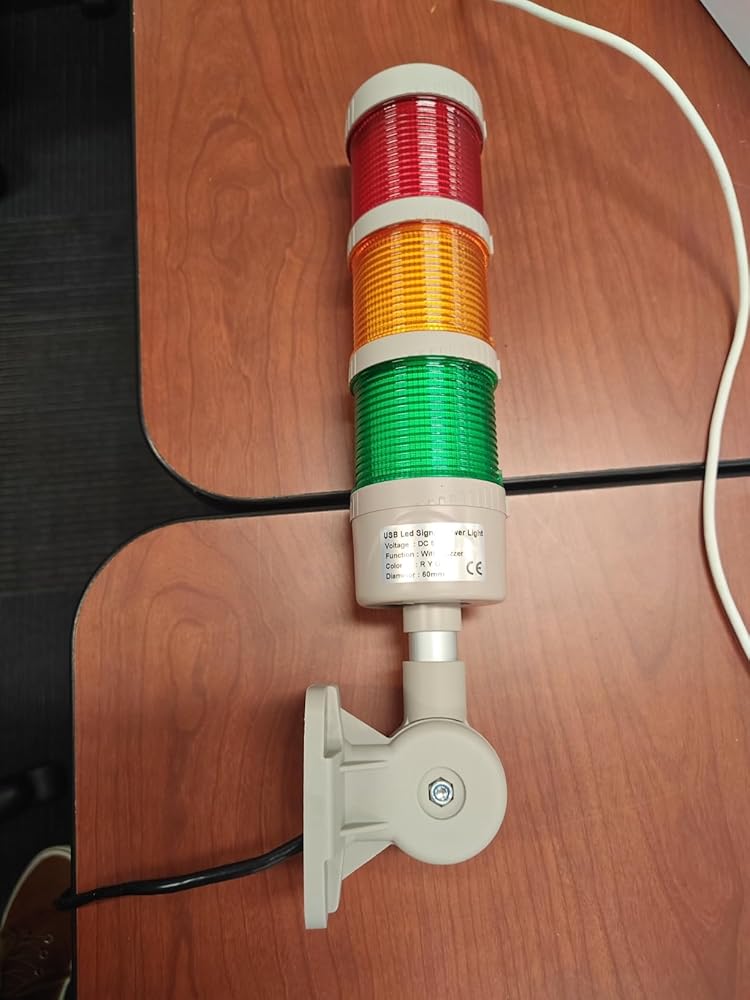
ANDONT USB 3-Stack LED Andon Tower Signal Light with Buzzer for Workstations, Industrial, 5VDC, Plug-and-Play(3 Stack)
ANDONT USB 3-Stack LED Andon Tower Signal Light with Buzzer for Workstations, Industrial, 5VDC, Plug-and-Play(3 Stack)
Couldn't load pickup availability
- Industrial-Grade Reliability Constructed with premium industrial materials and precision manufacturing, ensuring long-term stable and reliable operation. Perfect for workstations, factories, laboratories, and warehouses to enhance production visibility and safety management.
- USB-Powered for Easy Deployment Standard USB (5VDC) power interface eliminates complex wiring. Can be directly connected to industrial equipment, computers, or standard USB power sources for fast plug-and-play installation, simplifying production line setup.
- Multi-Layer Visual and Audible Signals 3-stack LED lights (Red/Yellow/Green) clearly display operational statuses, complemented by a built-in buzzer producing up to 85 dB. Easily noticed in bright factory environments, improving workflow efficiency and alert response.
- High-Brightness and Energy Efficient Equipped with high-brightness LED chips with a wide viewing angle. Low heat generation, long lifespan, and energy-efficient design reduce maintenance and operational costs while ensuring reliable performance.
- Compact and Flexible Installation USB interface and compact design allow simple mounting on workstations, machinery, or other equipment without tools. Plug-and-play setup enables quick relocation and adaptability across different production environments.
-
Product description

ANDONT Stack LED Andon Tower Lights,Industrial Warning Lights

Operation steps:
1. Plug the light into the USB port.
2. View My Computer-right-click Management, System Tools-Device Manager, double-click the port (COM and LPT), and view the COM serial port number.
3. Open the USB three-color light debugging driver-commassistant.exe (you can also use other serial port debugging tools)
4. Select the COM serial port (whatever COM number you checked in the first step, select it here), serial port baud rate:
9600, 8 data bits, 1 stop bit, no parity bit. Check the hexadecimal system, send the corresponding code on the left to the blank area (note that there are spaces in the middle of each group of hexadecimal systems), click Send, and you can control the color and buzzer. (In practical applications, customers can make their own serial port tool and automatically send codes to control the desired effect)
5. After the test is OK, close the software and unplug the USB.
(Note: The status of each color can be controlled individually. After sending the control, you need to send the light-off signal again, and the corresponding color will turn off the light. The flashing frequency of all colors and buzzers is once per second.)

Introduction:
1. Exquisite structure, simple and beautiful, high cost performance;
2. the overall heat dissipation is good, to ensure product life;
3. can adjust the volume, function;
4. multiple colors can be freely combined.

USB-Powered Industrial Warning Lights
WARNING: PLEASE CONFIRM INPUT VOLTAGE BEFORE WIRING, AND ENSURE THE POWER IS DISCONNECTED
Enhance your automated assembly line with our innovative industrial warning lights. These USB-powered devices offer a practical solution for visual alerts in various industrial settings. Designed for efficiency and reliability, our warning lights are easy to install and operate, drawing power directly from a USB source. Ideal for use in automation equipment, security systems, and manufacturing environments.
 ANDONT USB 2-Stack LED Andon Tower Signal Light with Buzzer for Workstations
 ANDONT USB 4-Stack LED Andon Tower Signal Light with Buzzer for Workstations
 ANDONT USB 5-Stack LED Andon Tower Signal Light with Buzzer for Workstations
 ANDONT 2 Stack Super Bright LED Andon Tower Lights with Buzzer, Red/Green, Of...
 ANDONT 3 Stack Super Bright LED Andon Tower Lights with Buzzer, Red/Yellow/Gr...
 ANDONT 4-Stack LED Andon Tower Signal Light with Buzzer, Red/Yellow/Green/Blu...
Customer Reviews 161616262219Price Number of Lights 2 4 5 2 3 4 Continuous/Flashing Continuous Continuous Continuous Flashing Flashing Flashing Colour Red,Green Red,Yellow,Green/Blue Red,Yellow,Green/Blue/White Red,Green Red,Yellow,Green Red,Yellow,Green Buzzer ✓ ✓ ✓ ✓ ✓ ✓


Collections
-

ANDONT 2-Stack Andon Tower Light
2-Stack LED Andon Tower Signal Light, Red/Green, On/Off, ABB Selector Switch, Mean...
-

ANDONT 3-Stack Andon Tower Light
3-Stack LED Andon Tower Signal Light, Red/Yellow/Green, ABB Selector Switch, Mean Well...
-

ANDONT 4-Stack Andon Tower Light
4-Stack LED Andon Tower Signal Light, Red/Yellow/Green/Blue, ABB Selector Switch, Mean Well...
-

ANDONT USB Stack Andon Tower Light
ANDONT USB Stack LED Andon Tower Signal Light with Buzzer for Workstations,...