


ANDONT
SKU:AT60-RYG-USB
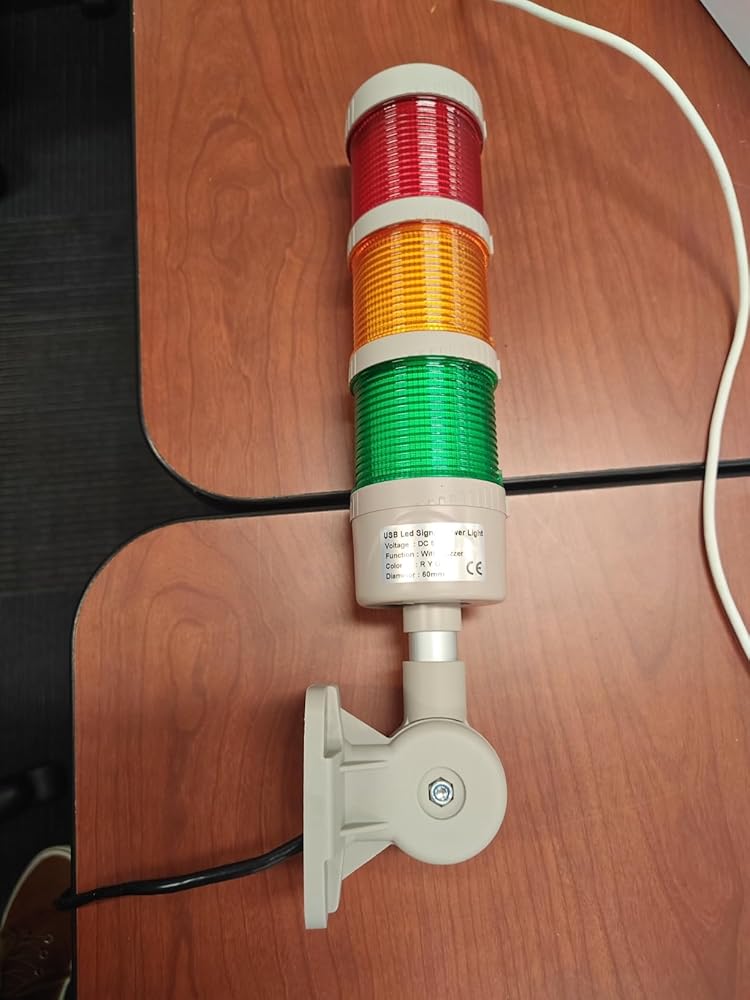
ANDONT USB 3-Stack LED Andon Tower Light with Buzzer
ANDONT USB 3-Stack LED Andon Tower Light with Buzzer
Couldn't load pickup availability
- Industrial-Grade Reliability Constructed with premium industrial materials and precision manufacturing, ensuring long-term stable and reliable operation. Perfect for workstations, factories, laboratories, and warehouses to enhance production visibility and safety management.
- USB-Powered for Easy Deployment Standard USB (5VDC) power interface eliminates complex wiring. Can be directly connected to industrial equipment, computers, or standard USB power sources for fast plug-and-play installation, simplifying production line setup.
- Multi-Layer Visual and Audible Signals 3-stack LED lights (Red/Yellow/Green) clearly display operational statuses, complemented by a built-in buzzer producing up to 85 dB. Easily noticed in bright factory environments, improving workflow efficiency and alert response.
- High-Brightness and Energy Efficient Equipped with high-brightness LED chips with a wide viewing angle. Low heat generation, long lifespan, and energy-efficient design reduce maintenance and operational costs while ensuring reliable performance.
- Compact and Flexible Installation USB interface and compact design allow simple mounting on workstations, machinery, or other equipment without tools. Plug-and-play setup enables quick relocation and adaptability across different production environments.
-
Product description

ANDONT Stack LED Andon Tower Lights,Industrial Warning Lights

Operation steps:
1. Plug the light into the USB port.
2. View My Computer-right-click Management, System Tools-Device Manager, double-click the port (COM and LPT), and view the COM serial port number.
3. Open the USB three-color light debugging driver-commassistant.exe (you can also use other serial port debugging tools)
4. Select the COM serial port (whatever COM number you checked in the first step, select it here), serial port baud rate:
9600, 8 data bits, 1 stop bit, no parity bit. Check the hexadecimal system, send the corresponding code on the left to the blank area (note that there are spaces in the middle of each group of hexadecimal systems), click Send, and you can control the color and buzzer. (In practical applications, customers can make their own serial port tool and automatically send codes to control the desired effect)
5. After the test is OK, close the software and unplug the USB.
(Note: The status of each color can be controlled individually. After sending the control, you need to send the light-off signal again, and the corresponding color will turn off the light. The flashing frequency of all colors and buzzers is once per second.)

Introduction:
1. Exquisite structure, simple and beautiful, high cost performance;
2. the overall heat dissipation is good, to ensure product life;
3. can adjust the volume, function;
4. multiple colors can be freely combined.

USB-Powered Industrial Warning Lights
WARNING: PLEASE CONFIRM INPUT VOLTAGE BEFORE WIRING, AND ENSURE THE POWER IS DISCONNECTED
Enhance your automated assembly line with our innovative industrial warning lights. These USB-powered devices offer a practical solution for visual alerts in various industrial settings. Designed for efficiency and reliability, our warning lights are easy to install and operate, drawing power directly from a USB source. Ideal for use in automation equipment, security systems, and manufacturing environments.


Collections
-

ANDONT 2-Stack LED Andon Tower Light Kit
Pre-assembled 2-stack (Red/Green) industrial LED Andon tower light stations. Built with genuine...
-

ANDONT 3-Stack LED Andon Tower Light Kit
Engineered for lean manufacturing, assembly lines, and machine monitoring, ANDONT 3-stack LED...
-

ANDONT 4-Stack LED Andon Tower Light Kit
Engineered for multi-state workstations, CNC machine cells, and complex assembly lines, ANDONT...
-

ANDONT USB Stack Andon Tower Light
Engineered for PC-based automation, automated test stations (ATE), robotic cells, and IT...


I have to start by saying that I love this little thing, but for reasons that won't translate to a very wide audience. It's a piece of plastic with a USB cable without any manual controller. I personally don't agree with the description that it's "fashionable" - I won't be mounting this on the wall in a prominent place. If I ran a warehouse and wanted to guide forklift traffic, I could mount it near an intersection to guide traffic, but there's stll the little detail of making it work.Therein lies the core reason why I love it: with a Raspberry Pi, or some other system where you can control a USB port, it's programmatically possible to activate the lights. It takes a 5V connection, which is, conveniently, what a USB port provides for power. On my Debian system it mounts as /dev/ttyUSB0 and you can set the communiation channel with "stty -F /dev/ttyUSB0 9600 cs8 -cstopb -parenb".From there it's possible to send Hex codes from the command line like this: "echo -e '\xA0\x01\x00\xA1' >/dev/ttyUSB0" You can make a light be steady on, flash, or off, and you can do that with all three lights simultaneously. There's also a beep you can turn on and off. My personal project goal is to grab some data, like weather conditions and the short term forecast, and then translate that into a pattern that indicates current conditions and the short-term forecast.That's why I love it - it's a project toy. There are some oddities about it and it comes with no documentation. If you buy it, print out the product description so you have a copy of the Hex codes! There are a couple of sentences with it that are the key to making it work. It leverages a buffer and I haven't quite figured out the right path to turning things on and off reliably (there's a sequence I need to crack).The hardware itself is decent enough as in it doesn't feel cheap, but it's plastic so don't hang something important from it. Also, the plastic base doesn't have a molded channel for the USB cable. If I mount this to a wall , I'll need to carve out some of the plastic so the base doesn't bite into the cable (there's a place at the base they thinner so you can make a notch). I wish they'd done that and provided just a little better documentation on how to send it signals.

The media could not be loaded.
I constantly work in linux based environments and was looking for an alternative lightpost to the network ones I've worked on in the past. It's true, that if you are working in windows, you will need a serial debugger to send the commands outside of scripting, but for me, linux is made for this stuff.I just watched what device this associated to on connection, for the port I chose to plug it into, I know it will assign ttyUSB0. Then I just made sure the tty speed was set to 9600 baud with stty, and then I could control this guy with simple echo commands...Example:echo -en '\xA0\x01\x01\xA2' > /dev/ttyUSB0(Will turn on the red light)An easier way to do this was create a bunch of files and just cat them out to the device to use in my environment. So I would create a file called red.on using an echo command...echo -en '\xA0\x01\x01\xA2' > red.onAnd then i can always call this file to turn the red light on...cat red.on > /dev/ttyUSB0In any case, i know this isn't the setting for this kind of stuff, but I just wanted to put some snippets in case it helps anyone else get up and running right away.I will say, at first I had weird issues. Some commands would go through and some won't. Strangely, as soon as I did a hexdump of the device it started behaving. Doesn't seem related, but I can't remember if I did anything else. Awesome device though.
The media could not be loaded.
So just to be upfront this model number doesn't appear anywhere online except Amazon. Also this exact form factor also appears to be unique to Amazon as far as I can tell. However the company behind it does actually exist and it does actually work as advertised however getting off the ground is a little rocky. I also managed to track down the official test program for a similar model by the same company. Running this test program makes it go through all the colors and buzzers sounds as well as the different intensities. Be aware that since these are available with extra colors it looks like trying to turn on a color you don't have seems to light a color you do have. For example if you say light blue LED in the sample program the red LED turns on because you don't have a blue.OK on the stuff you really want to know. To find the real manufacturer test program, along with the same commands that appear in this listing, web search for product USB Stack Light SL60USB, you'll come up with at least one stack light website and it will have the test program, the specifications, the marketing info, and a picture of a similar unit to this one but in black plastic.Be very aware that this unit's method of communication does not respond to terminal programs through a terminal serial emulator. So if you're trying to start a software serial terminal on your windows machine to send a commands, that will not work. For two reasons. Reason number one is you do not send these commands with any kind of terminating character. Not a carriage return and not a line feed. They literally have no terminating character. Secondly they actually don't respond to strings. Which is odd because the product listing sort of tells you that you're entering hexadecimals but shows you a string.Right now I've not actually written a program in a low-level language but I used a high-level serial monitor program to replay a several commands and got the light to respond successfully. I'll update this review if I find myself in technical error.The data and the view of the data are actually two separate things in a lot of these serial programs. They literally want you to put in the byte that that hex value equals (a0 rep but byte int 160), the space is for presentation only so that you don't wind up with a different hexadecimal value from clumping the hex representation together into a single number. So when they show you the values the spaces are to keep the hexadecimal representation from changing because if you had no space you would actually get a different number entirely when reading it as a human being. So they literally want you to have four hexadecimal values, each one representing a byte value so the command you're sending is only four bytes long!!! There are no spaces nor is the space character part of the final command. Four hexadecimal values, four bytes, one command. I hope that clears that up.It took me longer than I'd like to admit to get this to work because I kept representing the hexadecimal as strings when I was trying to input the command. Because it looks like they're literally saying put in the string with these text values. That's not what they're trying to say, they're trying to say that you need to put the bytes, without the space, representing a single command. The commands are persistent as suggested in the Amazon listing. For example if you wish to light the green light and the orange light you send two commands, one to light the orange, one to light the green, and then to turn both of them off you have to send both their "off" commands as well. The blinking command persistently blinks but you can't change the rate of blinking.Over all the lights are pretty bright and even the loud and soft buzzers are pretty distinct so I like the options there. I have not seen how fast you can transition the commands.Also one word of warning, the light stack actually does send data back but you have no idea what really it means. So unfortunately even though you're blindly sending commands and trusting that those are working, and for the most part they do seem to.If I had to guess off the top of my head what it looks like it's doing is you send it your command. It sends your command back to you then writes a 01 00 00 00 back at you to indicate a successful illumination. So I guess you'll have to watch out for that and make sure that you're properly clearing your receive buffer so that you don't wind up with a problem.This would be a great little resource for schools or other venues for projects to learn how to do some programming where you get to illuminate the light and play with it. I was a little upset at first about how little information I thought the product listing provided and couldn't find a way to get more information. But I just harped on the fact that these lights can't be that unique an...
I am reviewing the product "ANDONT USB Stack LED Andon Tower Lights with Buzzer, Industrial Warning Lights" on 13 October, 2024.I'm always on the lookout for "annunciator" devices to work with my home automation system. Several manufacturers offer Z-wave or Zigee-compatible "siren"-type devices, which are good for alerting major incidents like intruders; they're loud and obnoxious by design. Some of them double as non-emergency alerts, offering a range of less alarming tones that one might use, for example, to chime when a door opens. This product has features that make it great for the latter category, events that call for a more subtle notification. 3 colored lights, green, yellow, and red, can be activated alone or in any combination with the other lights. Each light can also either shine solid or blink to indicate two different states. And finally, it also features a "beep" audible alert that can play at normal or loud volumes, and with a continuous or pulsing tone. All of this controllable by emitting character strings to the logical USB socket created by a computer operating system when the device is plugged in.I set this up on my Mac Mini computer, and hacked together a quick CGI application so I can command it from Hubitat and activate the lights and beeper using Hubitat's native mechanisms for turning lights and sirens on and off. The whole system is a little complex to set up, but clever hackers should have no trouble crafting a suitable server app and the Hubitat virtual devices to talk to it. So far, mine alerts me when someone's in the bathroom, and when the doorbell rings. I find it to be a reliable, fun, useful, and flexible additional annunciator for my smart home, and I recommend it to home automation enthusiasts who don't mind rolling up their sleeves and writing a little code.For Macintosh users owning one of neat devices, I offer the following BASH script to get you started. I hope it inspires great and cool uses in your home. (This script is designed to run under macOS, since it relies on the Apple system_profiler utility. Users of other operating systems may choose to adapt it for their environment.)#!/bin/bashLOGFILE=/var/log/signallight.logtouch "$LOGFILE"echo "$0 run begins ********************************" >> "$LOGFILE"# Function to locate the correct serial devicefind_serial_device() { # Get all location IDs for the specified Product ID locations=() while IFS= read -r line; do locations+=("$line") done < <(system_profiler SPUSBDataType 2>/dev/null | grep -A 10 'Product ID: 0x7523' | grep 'Location ID' | awk '{print substr($3, 3, 6)}') # Initialize variable to keep track of the newest file newest_file="" newest_time=0 # Loop through each location ID for location in "${locations[@]}"; do # Construct the device file path device_file="/dev/cu.usbserial-$location" # Check if the device file exists if [ -e "$device_file" ]; then # Get the creation time of the device file creation_time=$(stat -f "%m" "$device_file") # Compare the creation time to find the newest if [ "$creation_time" -gt "$newest_time" ]; then newest_time=$creation_time newest_file=$device_file fi fi done # Use the newest serial device if found if [ -z "$newest_file" ]; then echo "No valid serial device found" >> "$LOGFILE" exit 1 else echo "Using serial device: $newest_file" >> "$LOGFILE" echo "$newest_file" fi}# Set the serial device with appropriate settingsserial_device=$(find_serial_device)stty -f "$serial_device" 9600 cs8 -cstopb -parenb# Function to send the hex string to the serial portsend_command() { local hex_string=$1 echo "Sending command: $hex_string to $serial_device" >> "$LOGFILE" echo -en "$hex_string" > "$serial_device" echo "Sent command: $hex_string" >> "$LOGFILE"}# Function to display available commandsshow_available_commands() { echo "Available commands:" echo " red on" echo " red blink" echo " red off" echo " yellow on" echo " yellow blink" echo " yellow off" echo " green on" echo " green blink" echo " green off" echo " beep loud" echo " buzzer on" echo " beep off" echo " all on" echo " all off" echo " all blink"}# Function to read and display a hexdump of any transmission receivedread_hexdump() { echo "Waiting for transmission..." hexdump -C < "$serial_device"}# Combine the input arguments into a single stringinput="$1 $2"# Command parsing logiccase "$input" in "red on") send_command '\xA0\x01\x01\xA2' ;; "red blink") send_command '\xA0\x01\x01\xB3' ;; "red off") send_command '\xA0\x01\x00\xA1' ;; "yellow on") send_command '\xA0\x03\x01\xA4' ;; "yellow blink") send_command '\xA0\x03\x01\xB5' ;; "yellow off") send_command '\xA0\x03\x00\xA3' ;; "green on") send_command '\xA0\x02\x01\xA3' ;; "green blink") send_command '\xA0\x02\x01\xB4' ;; "green off") send_command '\xA0\x02\x00\xA2' ;; "beep loud") send_command '\xA0\x04\x01\xA5' ;; "beep on") send_command '\xA0\x04\x01\xC7' ;; "beep off") send...
I really love the simplicity of this light tower when controlling with a computer. I am using a Pi and it is nice to be able to power and control this all over a USB connection. The documentation is clear in the commands to send to the tower for control using a serial interface over the USB port. I use Python to control the tower for conditions around my 3D printing machines.
Works great and very bright
I didn't get any instructions aside from what was up on the product page and there's no software provided directly but it does work quite well and is easily addressable directly.Pair this with an Arduino or Raspberry Pi or, any embedded system really and you can really do a number with it in terms of integrating a rather solid visual status representation. I'm thinking personally I may work on a 3D print monitor that changes the light based on the state of the print in progress and of course, annoy me when an error occurs.
Great visibility and functionality. The LED lights are bright, and the buzzer is loud enough to catch attention. Perfect for signaling in a busy workshop.
This tool reminds me of the old "yellow, red" card warning system I had to use at work many years ago. That said, it does exactly what it is supposed to do.I picked up the ANDONT USB Stack LED Andon Tower Lights with Buzzer to help manage the status of our manual telephone intake process, and it has proven to be a reliable tool. When the workload spikes, flashing it to red alerts everyone in the room, thanks to the bright lights and the loud, discernible buzzer. It’s clear and effective, exactly what we needed to maintain smooth operations. At around $120, this is a great investment for any high-stakes work environment.An STG Synergies BTN Enterprises Review!
This is a review for the USB Stack LED Andon Tower Lights with Buzzer. While it is somewhat of a specialty product, it performs exactly as advertised! I started off by piping commands on a Linux host to the serial device, then the same on a Raspberry Pi. All lights lit properly in solid or flashing mode and the beeper/buzzer sounded as expected. The lights were incredibly crisp and visible from a distance even in a well lit room. All of the serial commands worked flawlessly once I hashed out the meaning of the wording for the beeping options.I plan to use the device to throw visual warnings from monitoring systems on a Raspberry Pi, and ended up writing a little Python script to store command files for each light mode/method, and send them via serial.
First, there's the almost total lack of documentation. As others have pointed out, the only documentation you get is what's here on the product page.If you send commands too quickly, it responds to them inconsistently. Maybe there's a way to send commands in batches so that it will respond to all of them, but, well, there's no documentation, so I can't imagine how I could find out. Ultimately what this means is that there is no consistent way to turn the green lamp off and the red lamp on at the same time. I have found that if you wait about half a second between commands, it works fine, but that's ... ugly. It seems like it's related to reading the commands back from the device; when I can't read the commands back, it won't accept a new command.Since it's not really possible to be certain that it's working correctly, it's hard to give it a high rating. It also has an annoyingly short USB cable. It's only about 30 inches long. It would have made more sense for there to be a jack and I could use whatever length cable I wanted to. I suppose you can get an extension cable, but it's annoying to have to have specialty cables.Also, another reviewer complained that the real brand name is "Andon", not "Andont". "Andon" is a manufacturing system that commonly uses this kind of stack light; it's not a brand at all, much less this manufacturer's brand.
This USB Stack LED Andont Tower Lights with Buzzer, Industrial Warning Lights, Column Tower Lights(NOT 24VDC, 3 Layer, with Buzzer)This unit requires some kind of PC/tablet connected via USB to operate.It is USB powered AND it REQUIRES the use of a "serial port debugging tool" to control it by sending hexadecimal code series to the com port the USB cord of this unit is hooked up to. All done through a clunky "serial port debugging tool". The mfg directs you to "Open the USB three-color light debugging driver-commassistant.exe " so I looked it up before I d/l or install and could NOT FIND it. What I did find was a bunch of warnings regarding virus and malware abuse of similar system comm tools by them dastardly hackers. So, gave up on that and am currently trying to hardwire / bypass the circuit board and control directly from relays. The printed PCB board internals say USB on them, so I am certain I will need relays to hardwire / operate from a standard 24V control structure.Gave 4 stars just bc it is a well made unit with integral mounting bracket. Now if I can only McGyver it without using hexadecimal codes from an open com port.NOTE: edited og review as supplier had listed as a 24V device. They have edited the listing, and I would give 5 stars for fit and finish, but the clunky, nay, kludgy USB "serial port debugging" control architecture keeps it at 4 stars.*** NOTE TO ANDONT *** ditch the USB control, make it 24V, wire a single supply wire to the + side of each stage (including buzzer), return on a single common, let the light operate by a plc or hand switch or whatever control a relay OUTSIDE and independent of your unit. You will sell a ton of these "basic" units to not only hobbyists, but also in the industrial / commercial market.Also, I bet you could do this basic package at a lower cost.Let me know if you build this basic unit?